back to home
Paradigms: Record the Struggle, Skip It Next Time
AI coding assistants have a memory problem. They’re stateless. Every conversation starts fresh.
This is fine for tasks the AI gets right on the first try. But the interesting tasks—the ones specific to your codebase, your conventions, your stack—usually require iteration. You guide the AI, it makes mistakes, you correct it, and eventually you arrive at something good.
Then the conversation ends. Next time, you start over.
The Problem
Some tasks are genuinely hard for AI. Adding a feature flag to a mature codebase might touch five files across three languages. The AI doesn’t know that config entries must be alphabetically ordered, that schema IDs must be unique, that naming conventions differ between C# and TypeScript.
You spend twenty minutes holding the AI’s hand. “No, not there—alphabetical order.” “Check the end of the file for the next available ID.” “Use PascalCase for the C# property.” Eventually it works.
Your teammate hits the same task tomorrow. Twenty more minutes. The new hire next month. Twenty more. The corrections never accumulate.
The waste isn’t the AI making mistakes. The waste is making the same mistakes repeatedly because there’s no mechanism for the learning to persist.
Requirements
The system should:
- Capture successful workflows after they happen, not before
- Preserves corrections made during the session (the gotchas)
- Parameterizes the workflow so it applies to new instances of the same task
- Shares knowledge across a team, not just one person
- Works with any AI that supports a standard protocol
The last point matters. Knowledge about your codebase shouldn’t be locked to one AI vendor.
The Design
A paradigm is a structured record of how to accomplish a task. It contains:
Paradigm
├── id: unique identifier
├── name: human-readable label
├── description: what this accomplishes
├── parameters: inputs the user must provide
├── steps: ordered instructions
├── context: files/docs to read before starting
├── gotchas: warnings extracted from corrections
└── metadata: author, version, timestamps
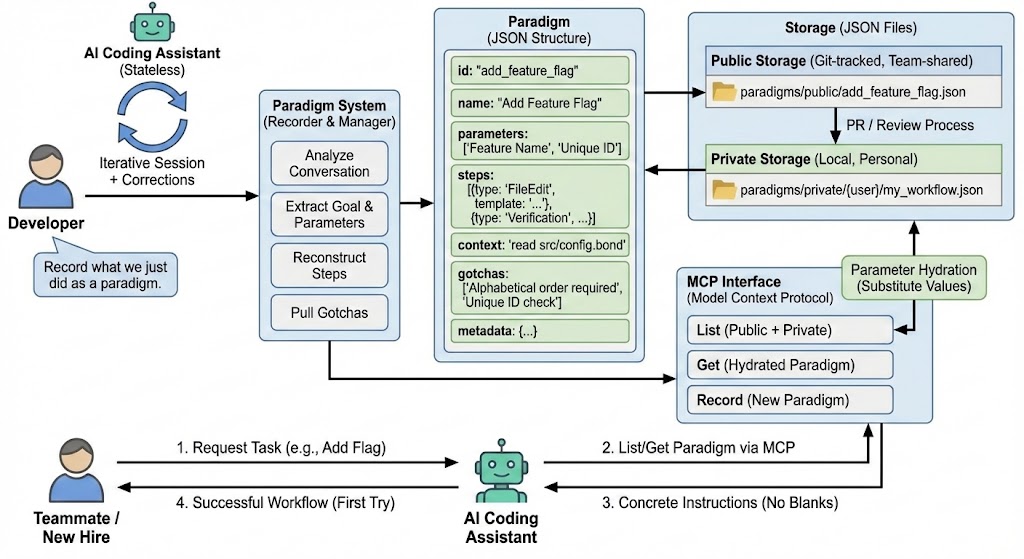
Parameters define the blanks. “Feature name?” “Unique ID?” These get substituted into the steps before the AI sees them.
Steps are ordered instructions. Each step has a type (FileEdit, Command, Verification) and template text with parameter placeholders.
Context triggers tell the AI what to read first. “Before starting, fetch src/config.bond to see the schema pattern.”
Gotchas are warnings. “Bond IDs must be unique—check the end of the file for the next available.” These come from corrections made during recording.
Recording vs Authoring
Paradigms are recorded, not written upfront.
After completing a task with AI assistance, you can say: “Record what we just did as a paradigm.” The system analyzes the conversation, extracts the goal, identifies variable parts as parameters, reconstructs the step sequence, and pulls out corrections as gotchas.
This matters because the tasks that need paradigms are exactly the tasks where you don’t know all the details upfront. If you knew every step and gotcha in advance, you’d just do it yourself. The valuable knowledge emerges during the doing.
Storage and Access Control
Paradigms have two visibility levels:
- Private: Only the creator can see and use it. Good for workflows you’re still refining.
- Public: Everyone on the team can access. Stored in version control, changes go through review.
The storage is simple—JSON files in a directory structure:
paradigms/
├── public/           # git-tracked, team-shared
│   └── add_feature_flag.json
└── private/
    └── {user}/       # local, personal
        └── my_workflow.json
Public paradigms are read-only through the API. To modify them, submit a PR. This matches how institutional knowledge should work—vetted before becoming official.
Integration
The system exposes paradigms through MCP (Model Context Protocol), an open standard for AI tool integration.
Three operations:
- List: Get all paradigms the user can access (public + their private)
- Get: Fetch a specific paradigm, with parameters hydrated
- Record: Create a new paradigm from the current session
When an AI fetches a paradigm, parameter placeholders get replaced with actual values. The AI receives concrete instructions, not templates.
Authentication comes through HTTP headers. The server knows who’s asking and filters accordingly.
Comparison: Claude Skills
Anthropic’s Claude Skills solve a similar problem. Key differences:
| Aspect | Paradigms | Claude Skills |
|---|---|---|
| Storage | Your files, your control | Anthropic’s cloud |
| Sharing | Team-wide with ACLs | Per-account only |
| Structure | Explicit parameters, steps, gotchas | Implicit |
| Portability | Any MCP-compatible AI | Claude only |
| Transparency | JSON you can inspect | Opaque |
Claude Skills are simpler—nothing to set up. Paradigms require infrastructure but give you ownership and team collaboration.
When to Use This
Paradigms are most valuable when:
- The task involves multiple files or systems
- The AI doesn’t get it right on the first try
- You’ve discovered gotchas through trial and error
- Other people will need to do the same task
- The knowledge isn’t documented elsewhere (or documentation is stale)
If the AI handles a task perfectly without guidance, you don’t need a paradigm. If it’s a one-off task, you don’t need a paradigm. The sweet spot is recurring, complex tasks where human correction is required but repeatable.
Summary
This isn’t revolutionary. It’s just saving your work.
You already spend time teaching AI how to do things in your codebase. Paradigms just make sure that teaching doesn’t evaporate when the chat window closes.
Record the workflow. Replay it next time. Share it with your team. That’s it.